Author: Glen
-
Financial Freedom
Today’s topic about sharing my thoughts about the market. Please be advised these are not any financial advice.
The whole email is about what I think has been happening for the last couple of years and whats going to happen next.
Its going to take you 3 mins to read.
“No, if you show revenue, people will ask ‘How much?’ and it will never be enough. The company that was the 100xer, the 1,000xer, becomes the 2x dog. But if you have no revenue, you can say you’re pre-revenue. You’re a potential pure-play. It’s not about how much you earn. It’s about how much you’re worth. And who’s worth the most? Companies that lose money.”
Hence today’s topic about financial freedom:
If your asset doesn’t do anything, it can be anything you want it to be.
For the last two years, market participants have been playing a fun game called “red line , green line.”
The rules of this game are pretty simple:
- Buy stuff when its red.
- Watch the line goes to green.
- Make money.
- Repeat.
Which lines went up the most? Growth stocks. Meme stocks. Crypto. NFTs etc. The more ridiculous the valuation, the wilder the story, the higher the line went.
After all, commission-free trading + historically low interest rates + fastest market crash in history + pandemic-induced lockdowns + trillions in quantitative easing + millions of bored people turning to the market for entertainment created one hell of a financial cocktail.
When there are trillions of dollars sloshing around, why wouldn’t you throw money at anything and everything? Right? Right? It’s like a giant game of hot potato – only with real money.
Just like any other game, as the game progressed , the pieces evolved. As more and more people started playing Red line , green line, the game grew more insane.
People were paying $500k for a JPEG? That doesn’t even make sense.
But like all other games, there is an endgame. The problem is, most players did not realize they were all a part of the game. They thought it was investing.
They assumed that good stories are making the line goes green, that their assets are growing more valuable. But this assumption isn’t true.
The stories didn’t make the assets more valuable. The stories gave others a contagious case of FOMO. And when other people who were not playing red line , green line they fomod in for fun because no one wants their friends to get rich without them. The more people fomod in , the line went green, the people who were playing the game , they sold some of their assets for a profit, hence the line became red.
So now half of the players thought their assets are valuable, and the other half felt like they were missing out. And this cycle went on for a while, especially when everyone had money to blow.
But what happens when that money starts to disappear?
For the past few years, it’s felt like everything has been going to the moon. Stock prices were skyrocketing, crypto was booming, and everyone wanted a piece in it.
Fast forward to May 2022.
Prices are crashing, inflation is real, gas is expensive, and layoffs are becoming more common.
In times like these, people have to make tough decisions with their money. And for the players who thought they were investing in something real, it’s a harsh reality check. They’re learning that their “assets” weren’t nearly as valuable as they thought. But for the players who knew it was all a game, they’re already planning their next move.
You can explain the potential use cases, road maps, and pitch decks all you want, but if it comes down to putting food on your table or NFTs in your wallet, you are going to choose the former so that your family can eat.
The internet is a funny place. It’s a place where you can be anyone you want to be, and where you can do anything you want to do. It’s a place where you can build entire worlds from scratch, and where you can destroy those same worlds with a few clicks of a button. It’s a place where fantasy and reality collide, and where anything is possible.
So what comes next? That’s the million dollar question. Most likely we’ll see a lot of consolidation and contraction in the industry as people realize that they can’t keep up the charade any longer. But there will also be opportunities for those who are smart and nimble enough to take advantage of them.
So whatever you do, don’t panic. This too shall pass. And when it does, those who are prepared will be ready to profit.
-
6 Lead Magnet Templates for Clickfunnels 2.0
You Must have a Clickfunnels 2.0 Account to use these funnels. They are available for a limited time. I will try my best to keep them update. If you want the best deal currently available for #clickfunnels go to: https://winwithglen.com/cf
Lead Funnel Template #1
Lead Funnel Template #2
Lead Funnel Template #3
Lead Funnel Template #4
Lead Funnel Template #5
Lead Funnel Template #6
6 Lead Magnet Templates for Clickfunnels 2.0 ($697 Value)
Disclosure: I am an independent ClickFunnels Affiliate, not an employee. I receive referral payments from ClickFunnels. The opinions expressed here are my own and are not official statements of ClickFunnels or its parent company, Etison LLC.
-
UpCoach – Course Creation Software
Upcoach is a modern transformation platform that lets you build and manage your coaching program with courses, chat, meetings, and tasks.
With upcoach, you can house all your courses and training for individual or group coaching programs to transform the lives of your clients.
Create courses with multiple modules and lessons. You can even choose the pace for completing each course by making it all available at once or dripping it out over time.
You’ll be able to assign interactive worksheets, to-dos, and new habits alongside the training so they’re not just downloading PDFs or copying Google Docs.
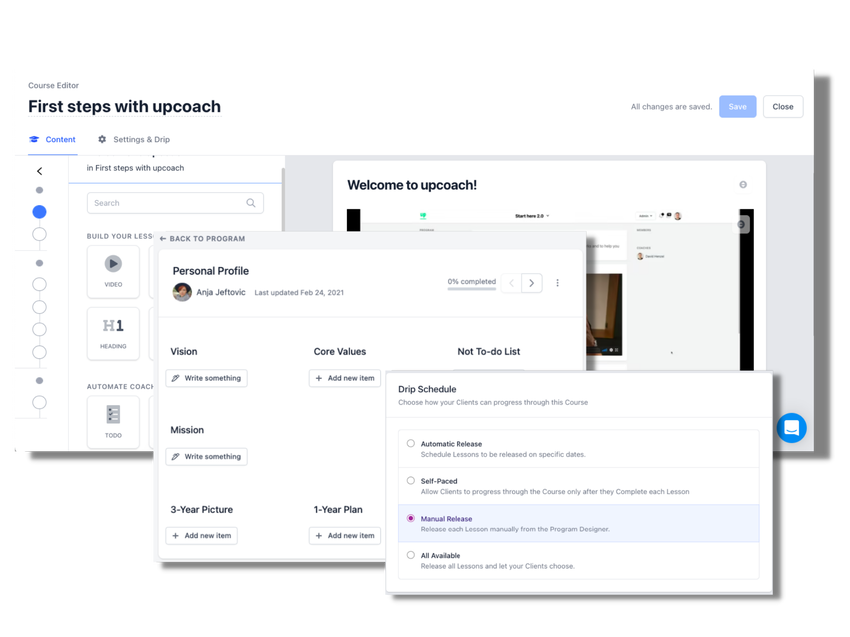
Create courses and assign to-dos, habits, and worksheets to ensure clients are learning and staying engaged.
Upcoach lets you build out your program with a drag-and-drop editor, so you can create your own no-code layout.
Use a template or create a program from scratch based on your unique needs and program structure.
You’ll be able to build a variety of program types, including one-on-one programs, group programs, cohorts, and masterminds.
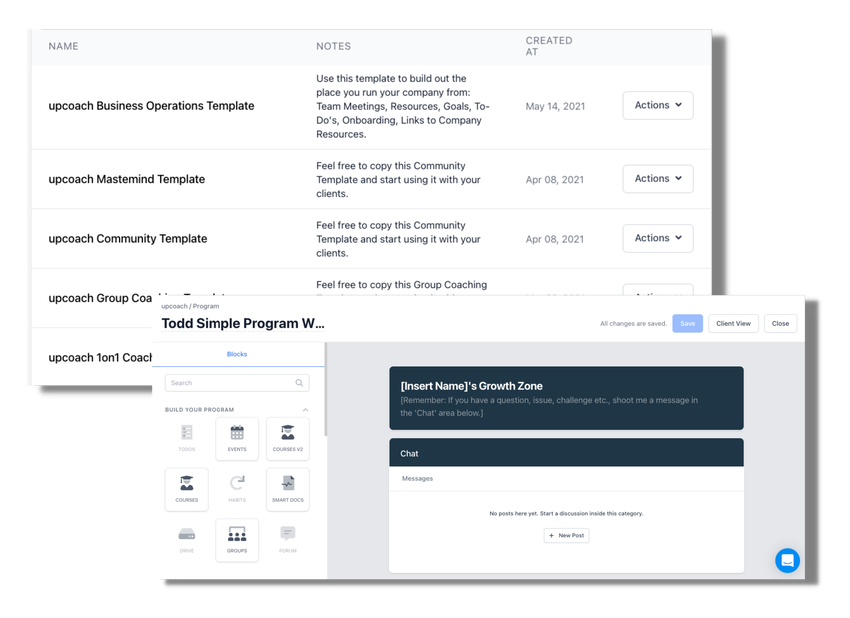
It’s super easy to lay everything out for your program using the drag-and-drop editor.
You can organize and schedule your meetings, as well as see an overview of all past and upcoming meetings, on the Events Calendar to avoid any scheduling conflicts.
Create a meeting agenda from scratch or use a premade template to keep your meetings or events running smoothly. This also gives your clients a place to ask questions and collect wins.
Upcoach also lets you connect meeting agendas to your Google calendar and add a Zoom link to invites, so clients can join meetings with the click of a button.
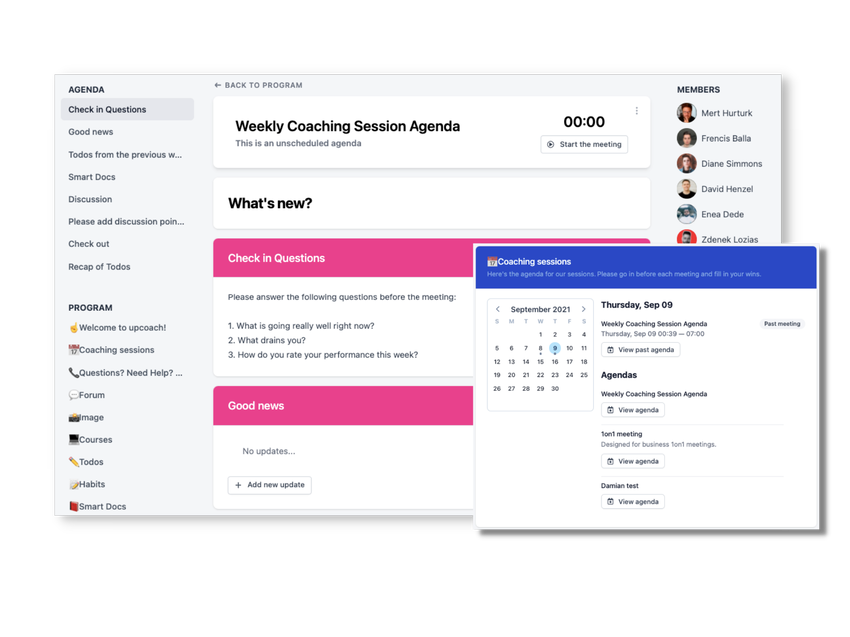
Keep everyone on the same page by organizing and scheduling meetings with agendas, right from the platform.
With upcoach, you’re able to track any client’s progress and engagement using a Kanban board—making this more than a passive consumption system.
Keep up with client progress using to-dos, habits, and worksheets, so they can implement what they’ve learned in the course and during coaching sessions.
You can also encourage social accountability and add motivation by allowing members to see each other’s commitments.
And because communication is so important for community-building, upcoach lets you chat with clients using one-on-one, group, and admin chat features.
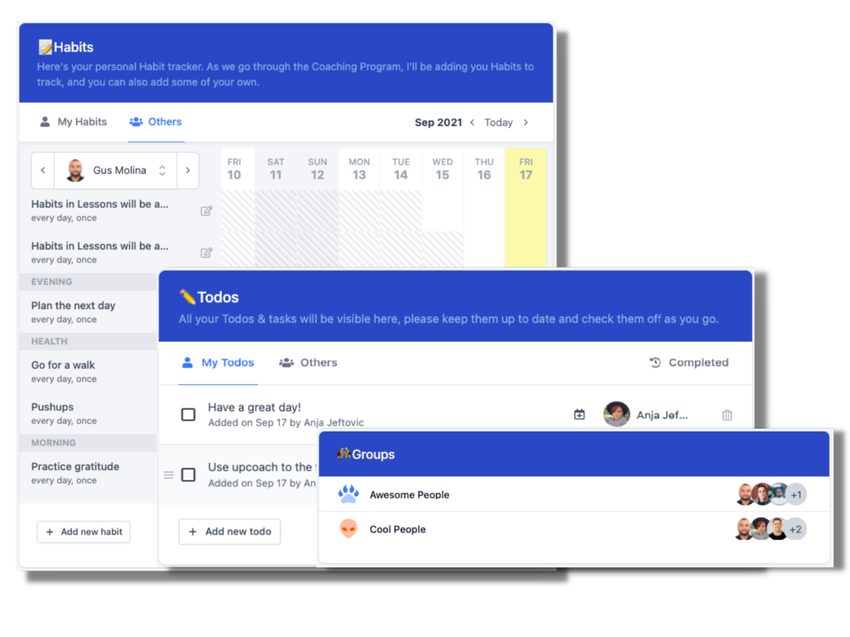
Track client progress with to-dos, habits, and worksheets that help them stay motivated!
In order to help your clients meet their goals, you need a platform that helps you achieve all of yours. (“Goal #1: Be the best coach in the game. Goal #2: Get eight hours of sleep per night.”)
Upcoach houses all of your courses, training, to-dos, groups, and communication history, so you can focus on what you do best—helping your clients flourish.
Scale your coaching program with ease.
This review is provided by Appsumo, on of the leading marketplaces for software deals.
-
How To Advertise on TikTok for 10 Bucks
SUBSCRIBE for more: https://winwithgen/com/youtube
In this video I show how to runs ads on #tiktok for as little as $10. This is not clickbait I will show you in this video 2 ways of advertise on tiktok with a limited budget. 0:27 How To Open a Tiktok Advertising Account #howtoadvertiseontiktok #tiktokads #tiktokcourse
-
The Role of Creative in the Ad Auction
Advertising on Facebook happens through an auction process to determine which ad should be displayed to each user. Learn how this auction works and the role creative plays in ad delivery.
Go to https://www.facebookblueprint.com/student/path/196025-the-role-of-creative-in-the-ad-auction?sid_i=2 to check it out
If you have a group you would like to grow come join us here
https://www.facebook.com/groups/howtogrowmygroup -
Creative Planning for Formats and Placements
Get an overview of all ad formats and placements that are available to you to aid your campaign planning. Use this course to learn about how placements work together to reach people more effectively. See case studies of how each format can deliver a different creative experience.
Go to https://www.facebookblueprint.com/student/path/191016-creative-planning-for-formats-and-placements?sid_i=1 to check it out
If you have a group you would like to grow come join us here
https://www.facebook.com/groups/howtogrowmygroup -
Four Dimensions of Liquidity – Intermediate Award
In this training, you’ll learn how media teams that embrace machine learning and Facebook liquidity tools become more efficient and uncover fresh insights. You’ll also learn about the tools that increase liquidity across four dimensions: budget, audience, placement and creative.
Lessons Included:
-
Machine Learning in Advertising
-
Budget Liquidity
-
Placement Liquidity
-
Audience Liquidity
-
Creative Liquidity
Go to https://www.facebookblueprint.com/student/path/196041-four-dimensions-of-liquidity?sid_i=0 to check it out
If you have a group you would like to grow come join us here
https://www.facebook.com/groups/howtogrowmygroup -
-
Create social videos in a snap with Meta Business Suite & Vimeo
Get ready, marketers. We’re changing the way you work.
What if you could create and add video to your Facebook ads, Instagram posts, and media library directly within Meta Business Suite? No more managing workflows across multiple tools. Plus, say goodbye to downloading video assets from other apps and re-uploading over and over.
We’ve combined the firepower of Meta with what we do best — ya know, video — to build a first-of-its-kind conduit for businesses and creators to access tools they need to generate content across Facebook and Instagram. With Meta Business Suite x Vimeo, you can create, customize, and schedule content within a single platform. The result? An intuitive, ready-in-minutes workflow designed for easy content creation and distribution.
Go ahead and close the tab on your post scheduler and content calendar. (We dare you.)
Here’s how you can use the Vimeo x Meta experience to create relevant content in just a few minutes with easy templates, or plan out your social media calendar weeks in advance.
How to create a post using Meta x Vimeo (in 4 steps!)
Looking to create a post for Facebook or Instagram, but need some inspiration? Here’s how to use Vimeo within Meta Business Suite for your next big social push.
- When creating a post to publish to your page, you’ll see an option to add media.
- Select “Use template” to browse Vimeo templates across dozens of categories like Facebook Ads, Reels, Marketing videos, and more.
- Start building your video by adding your logo and brand info, animated stickers, music, filters, and more. Click “Save & preview,” and voila! You now have a scroll-stopping post made in mere minutes.
- Add your call-to-action, caption, and publish directly to Facebook or Instagram!
How to plan your social media calendar using Meta x Vimeo
You don’t need an actual production team to make a calendar’s worth of social videos for your biz. With Vimeo x Meta, you have a virtual production team at your service.
Here’s how to get strategic with planning video posts for holidays, big moments, and timely occasions you might not know about.
- Within the Meta Business Suite Planner, you’ll immediately see a calendar view, complete with upcoming holidays and events.
- On the right side, choose an upcoming Moment that will resonate with your audience, then click “See templates.”
- Browse dozens of customizable Vimeo templates pre-designed for your exact use case — whether that’s a holiday promo video or a marketing video ad.
- Select a template, then customize away! Upload additional media, add text to your video, pop on filters and stickers, add background music, and more.
- When you’re all done editing, hit “Save and preview” to save your changes.
- Add your call-to-action, caption, and pre-schedule the post within the Planner.
Are you ready to harness the power of video for your small business, and make stellar social content for Facebook and IG in the process?
Get started with Meta Business Suite x Vimeo today.
ABOUT THE AUTHOR
Caitland Conley
Caitland is a content strategist at Vimeo. She’s passionate about writing, helping small businesses grow their marketing, very foamy cappuccinos, and her elaborate WFH skincare routine.
-
Content Creation Software Growthworks Overview
https://www.youtube.com/watch?v=lKNtiUhvmBQ
#businesscoachonline #homebasedbusinesses


